Simulated Process Color Separation
Professional Simulated Process color separation for screen printers and print shops, built around the artwork and real screen printing production.
Explore the service →
A screen-printing color separation specialist with more than 20 years of experience in Spot Color, Simulated Process, and file preparation for clients in Brazil and worldwide.
 @photoshopsilkscreen ↗
Joel Mariano works with the image, channels, and real printing conditions to build separations that can be understood and carried out in screen-printing production.
My work does not begin with a technical category. It begins with the image and the result it needs to produce.
This space brings together the way I prepare images and color separations, the decisions that are part of each file, and the care required to preserve the result during screen-printing production.
The content is organized as a continuous reading experience, divided into chapters and accompanied by visual examples. A narrated version is also being prepared so that each section can be heard while viewing the images and following the explanations.
Every artwork is assessed individually. Explore the services currently available.
Professional Simulated Process color separation for screen printers and print shops, built around the artwork and real screen printing production.
Explore the service →Professional DTF artwork preparation with image cleanup, upscale, Spot White, halftones, special Spot channels and editable PSD files.
Explore the service →Download demonstration artwork, examine the channels, follow the print sequence, and understand how the file was prepared before testing it in your own production.
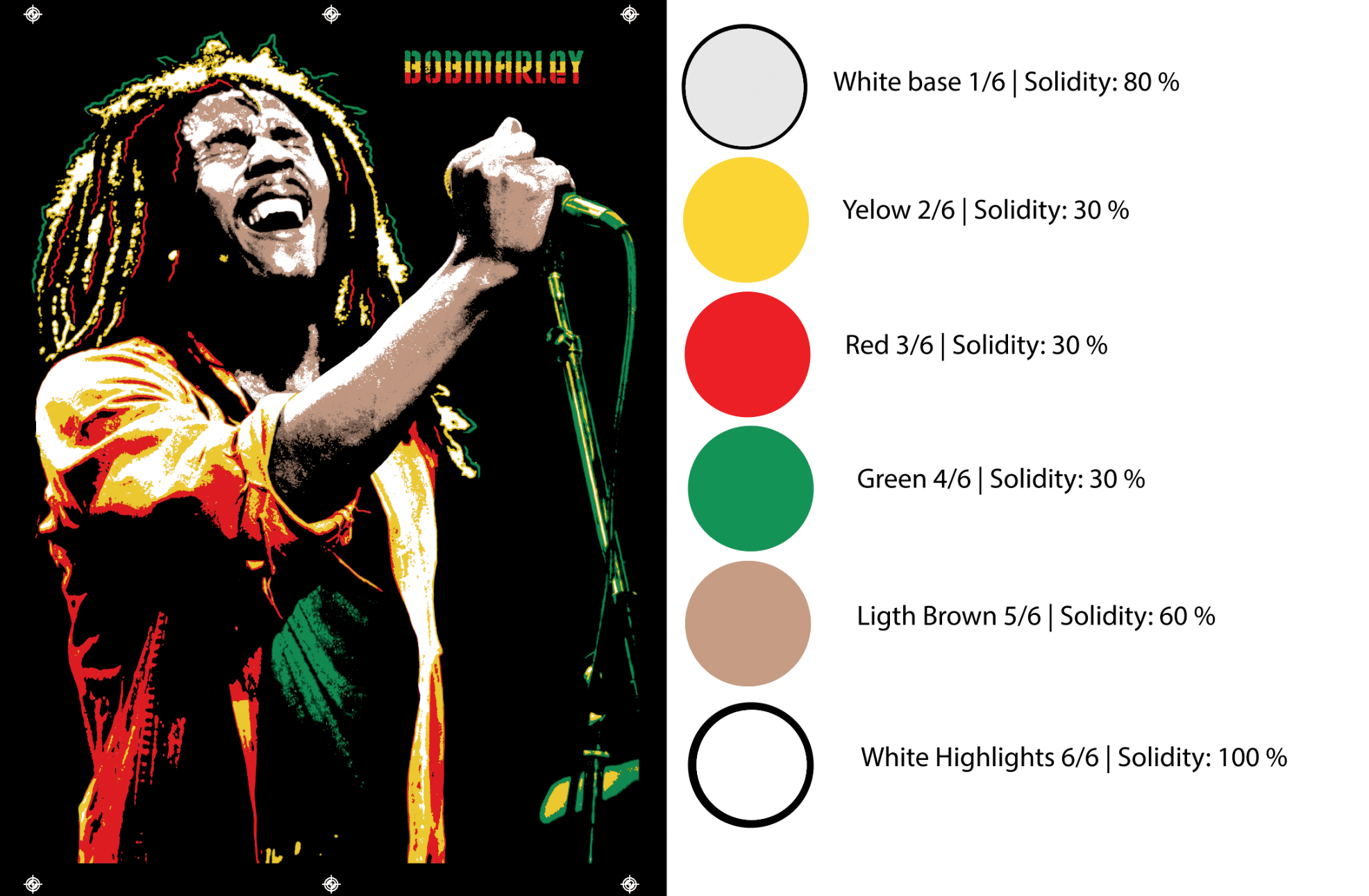
This study presents a six-color separation prepared exclusively for printing on black T-shirts. The image uses yellow, red and green as accent colors, together with light brown to build the skin tones and two white channels with different roles.
The aim was to prepare an image that could be printed in two ways: using a white underbase to support the colors, or printing directly onto the black fabric, provided that the inks have sufficient covering power.
The white underbase mainly provides support for the colors that follow. It was prepared with moderate coverage to avoid laying down an excessive white layer at the start of printing. Its role is to help preserve color intensity when the selected inks do not cover black adequately on their own.
The edges of this underbase also required careful control. Because the image contains fine lines and details, I applied a slight choke to keep white from showing around the colored areas if small registration variations occur during printing.
Another important consideration was the fit between colors. In certain areas, I slightly spread the yellow to improve its overlap with the red. This adjustment was also applied to the elements of the Bob Marley lettering, helping prevent small gaps between colors without compromising the definition of the design.
The highlight white was prepared separately from the underbase. It can strengthen light points, define volume and recover important image details. Its use is optional and can be adjusted to suit the intended result.
If the printer chooses to omit the white underbase, the color channels can be printed directly onto the black T-shirt using high-opacity inks. In that case, highlight white remains available to build the light areas and help define the image.
The PSD file allows each channel to be examined individually, the separation to be compared with the original image and the adjustments to be understood. The original reference was also retained in the file to make this comparison easier.
Although this is a relatively simple separation, the result depends on important decisions: control of the white underbase, registration between colors, ink coverage and the balance of highlights. These small adjustments help keep the image well defined without overloading the print.
Joel Mariano — PhotoshopSilkScreen
| Screen | Color | Solidity |
|---|---|---|
| 1/6 | White Base | 80% |
| 2/6 | Yellow | 30% |
| 3/6 | Red | 30% |
| 4/6 | Green | 30% |
| 5/6 | Light Brown | 60% |
| 6/6 | White Highlights | 100% |
The Solidity values correspond to the settings shown on the study’s technical sheet, not to ink-mixing proportions.
The download includes the PSD with the complete separation, the original image in JPEG format and a reference image identifying the six channels. These files allow you to examine how the separation was built and compare the result with the original image.
Download the Bob Marley test files.This study complements the article Two ways to build a layered image in screen printing by demonstrating a separation that can be adapted for use with or without a white underbase.
Read the Knowledge articleExplore the test files →The editorial area brings together articles based on real color-separation and artwork-preparation situations.
New article — DTF artwork preparation — LATEST UPDATE ·
A real job shows why enlarging an image and removing its background aren’t always enough to make it ready for DTF printing.
Explore Knowledge & Resources →The Guide brings together six chapters about interpreting and printing the files, plus nine sections dedicated to image preparation.
A guide to understanding the decisions made during color separation and preserving those decisions in screen-printing production.
Talk directly with me, in your language.
The chat automatically translates our conversation in real time.